When I think about Google, I tend to really be focusing on Google for Education. Last year I learned about a different team, Google’s Trust & Safety group. First, I was struck by the seriousness with which Google considers the online conduct and interaction of all of its users. Consider the comments section in a YouTube video, the Trust & Safety group works on policies and technical mechanisms for trying to maintain civil and constructive dialogue within that platform. They may not use the term digital citizenship to describe their focus, yet, in essence, that is their mission: supporting positive and productive digital interaction, globally. And I thought just trying to do it in my school was a daunting mission!
Last year, the Trust & Safety group brought their work to schools in the form of a virtual reality anti-cyberbullying curriculum. Partnering with the media production group, Harmony Labs, researcher Dr. Dorothy Espelage, and others, the team unpacked some important research:
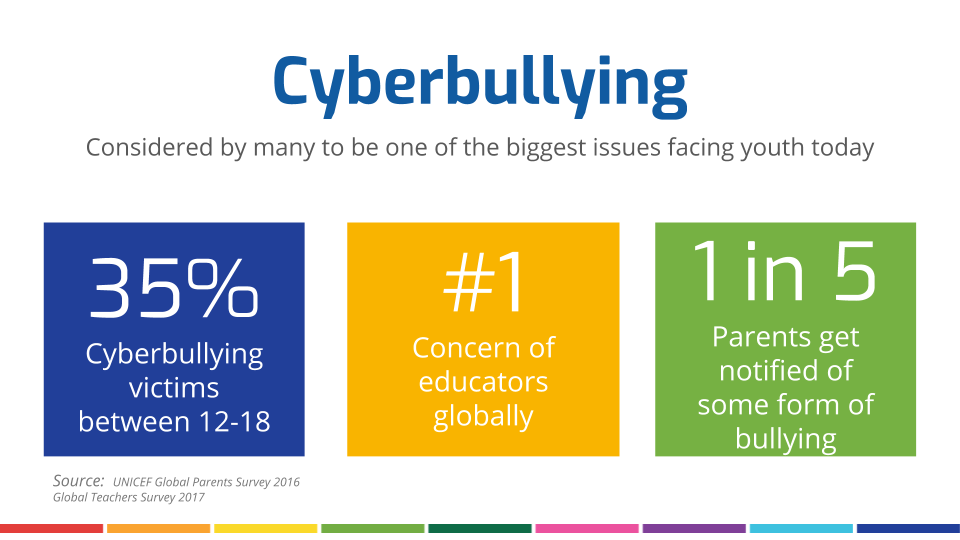
Furthermore, they learned that more than half of bullying incidents stop when a peer intervenes which lead them to the curricular objective of empowering bystanders to intervene in bullying situations. And, they chose virtual reality as the means of delivering the program they developed because VR provides a private, immersive experience. Participants do not have to be concerned about how they are being perceived by their peers which results in sincere and thoughtful engagement in the content.
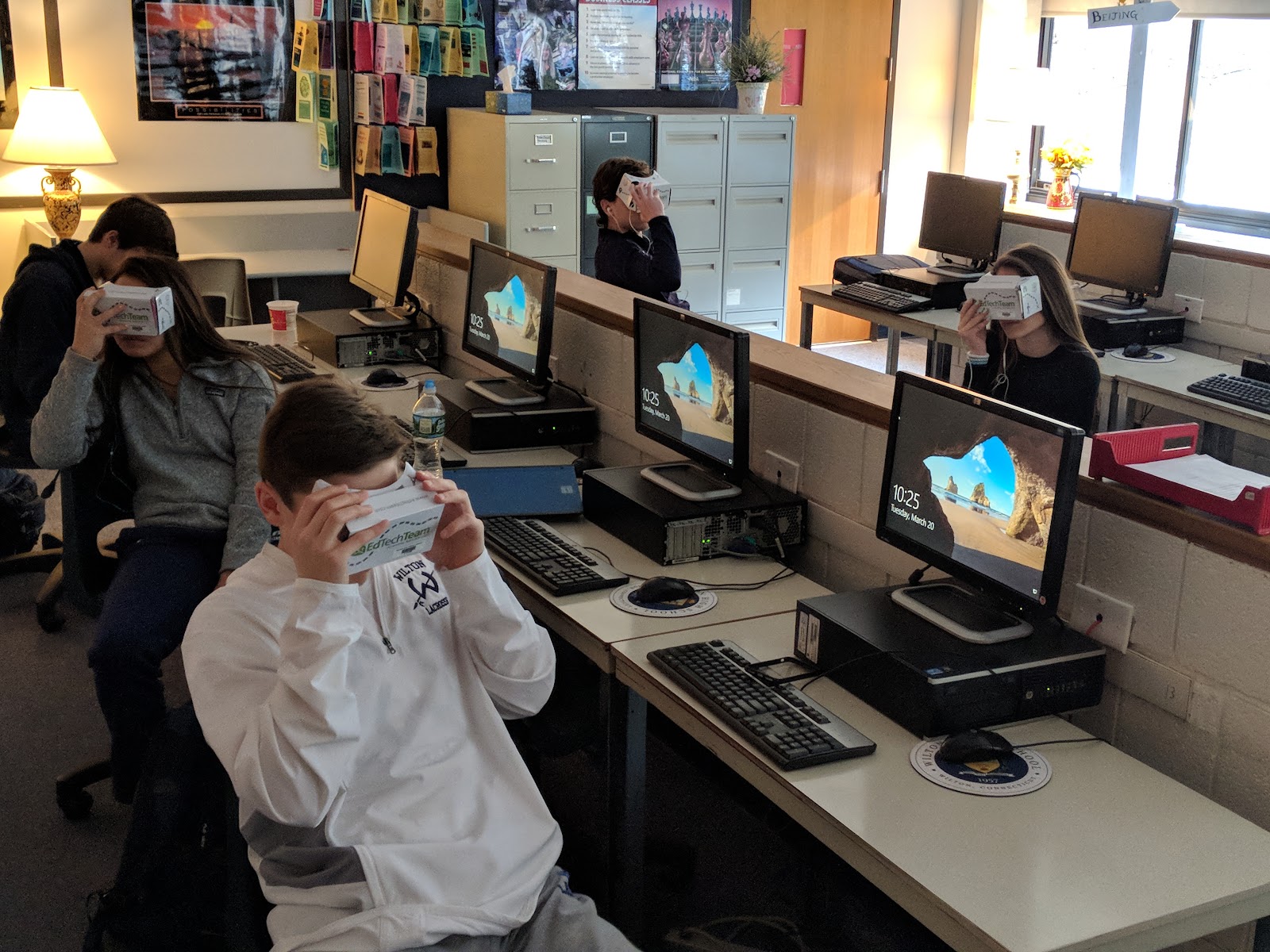
With that introduction to the program I jumped onboard with a class of ninth grade students. With a little advanced planning, implementation was easy! I do not have access to a class set of Daydream viewers and Pixel 2 devices so we substituted our Google cardboards and the students’ smartphones. I asked (and reminded) them to bring their own headphones so they each could listen to the videos without disturbing each other. The curriculum guide that Google provides is easy to follow with thorough teacher directions and talking points. I could easily modify it to meet the experience level of my students. Here is a quick schedule of what we did:
Day 1: I posted this Google Classroom announcement: For the next week you will need daily access to smartphone and headphones. Please let me know if you would like me to provide you a device. (For those students I had iPods in our library they could borrow). If you do not already have it, please install the YouTube app.
Day 2: I made this in class announcement and posted it as a Google Classroom reminder: please bring your phones and headphones to class tomorrow with the YouTube app already installed.
Day 3: The lessons began with a quick discussion of “what is virtual reality?” Then we followed the instructions in the curriculum guide for the first video lesson which included immersing in the 360° video experience. Students watched the 8 minute long video twice. The first time, the students watched on their own. The second time, I divided the class into three groups and assigned each group a character or group of characters on which to focus as they watched. Then we dove into a deeper conversation about the content.
Full disclosure: I was nervous. I was so concerned that this would just be one more forced conversation on a topic they didn’t want to discuss where a couple of students say what the teacher wants to hear just to get the lesson over with while the rest of the class stares into space and disengages entirely. Spoiler alert: the exact opposite is what happened, and I was amazed!
In small groups the students engaged with each other in a thoughtful discussion of what they had experienced, virtually. They discussed whether they thought the scenario was realistic, they considered the authenticity of the characters, they commented on identifying with certain characters based on their past experiences. When we reconvened as a whole class to talk some more they started to share experiences and talk to each other about how those real situations unfolded and what they could be doing about it. One student said, “It doesn’t end like that. We aren’t going to be friends in the end. We can’t be. When something like this happens, your friend group shifts. I want these programs to help us with that.” Lots of students added their agreement to that comment. Another student said, “Just like Kacie in the VR, sometimes you are bullied because of something you have done. And if I did what she did, and was bullied, I’m not going to tell an adult what I did so I’m not going to get help. I need someone else I can talk to for help.” Finally, another golden comment from a student: “I once did exactly what this told us to do: I told a safe adult and that person didn’t help me. So I’m not going to tell an adult again.”
Whoa. On the surface, this may sound like the experience missed the mark, but it didn’t at all. Look at all of the important information it exposed: Students want us to understand (empathize with) their experience so we can help them accurately. Students want and need peer support, so we need to train peers to help peers. And, students want us to be equipped to help them and many of us might need training to do that well.
Days 4 and 5: We continued with the two remaining VR experiences following the curriculum guide outline. Then I asked students to compare the VR lessons with other digital citizenship and bullying lessons they have experienced. They were in 100% agreement that this experience was different in a meaningful way. Here is how one student explained it: “We were there. I mean, you couldn’t avoid what was happening because we were in the scene. I had to admit what was happening was real.” When I pushed them to comment on why that mattered, another student said, “I felt bad about what was happening to someone so I wanted it to stop.” And that is the magic of this experience: it helps build empathy. VR is more than bells and whistles when it is used to quite literally help students walk in someone else’s shoes!
Days 6 and 7: I am fortunate to have a 360° camera so the final exercise for the students was to create their own VR video which we loaded to our library YouTube channel. Just as with the curricular videos, the student-created ones can be launched in the YouTube app and watched with a Google cardboard for an immersive experience. I gave students one day to examine how a 360° video is different from a traditional one and plan their script for a one minute video. The next day, five student groups each filmed their videos. This might be the fastest video project I have ever facilitated!
Day 8: We took out the cardboards, phones, and headphones one more time so they could watch each others videos and provide feedback. The students were able, in their own voices, to explore what cyberbullying looks and feels like in their own peer groups and begin the process of starting a conversation in our school.
Of course this curriculum is not a one-stop, surefire solution to a problem we all face in our schools and communities. It did start a conversation among my students that had more depth and buy-in than anything else I have experienced with students on this topic. And it all comes back to how the virtual reality helped them develop empathy.